Handle mouse and touch events
Some objects and behaviors make mouse and multitouch easier to handle for specific cases:
For more specific cases, mouse and touches events can be accessed directly.
Handle clicks and taps on objects
"The cursor/touch is on an object" condition checks if the mouse cursor or a screen touch is over an object.
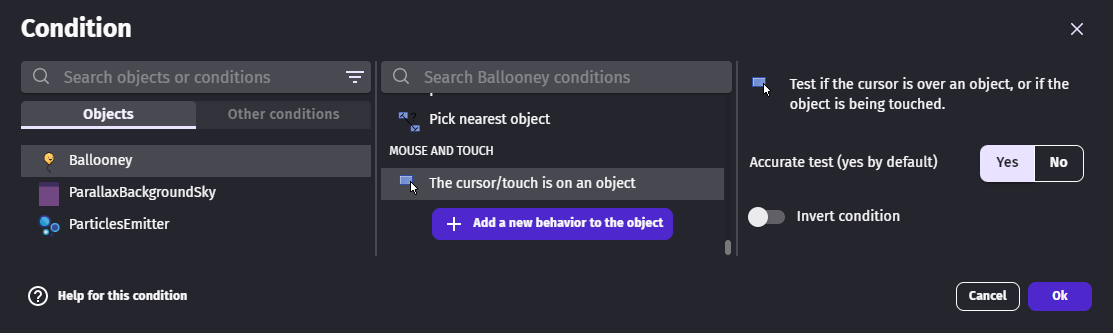
This condition can be used with "Mouse button pressed" or "Mouse button released" to check if the object is clicked or taped.
The expressions CursorX and CursorY give the cursor position in the scene. Both accept an optional layer name and camera number so the returned coordinates are relative to that layer's camera — useful when layers scroll independently. For instance, it can be used to create an explosion effect exactly at the cursor or touch location.

Mouse buttons
GDevelop supports multiple mouse buttons. When using the "Mouse button pressed" or "Mouse button released" conditions you can choose which button to test:
- Left — the primary click button
- Right — commonly used for secondary actions (context menus, aiming, etc.)
- Middle — clicking the scroll wheel
- Back / Forward — side buttons found on some mice
Right-click can be especially useful for games where the player needs two distinct interactions without using the keyboard.
Mouse wheel
The mouse wheel is useful for zooming cameras, scrolling menus, or cycling through weapons and items:
- The "Mouse wheel scrolling up" and "Mouse wheel scrolling down" conditions detect the scroll direction each frame.
- The
MouseWheelDelta()expression returns the exact scroll amount (positive when scrolling up, negative when scrolling down), which can be multiplied to control zoom speed or scroll distance.
Handle manually multi-touch gestures (advanced)
When only one touch is done at the same times, the mouse events can be used to keep things simple. Indeed, by default touch events are mirrored by mouse events. This can be disabled with the action “De/activate moving the mouse cursor with touches” when handling both multi-touch and mouse events to avoid echo.
Multiple touches can happen at the same time. The touch identifier must be used to tell them apart. It can be done by following these steps:
- At the start of a touch, the touch identifier can be retrieved with the
StartedTouchOrMouseId(Number)expression (the index0gives the first touch that started this frame,1the second, and so on). The total count of touches that started this frame is available viaStartedTouchOrMouseCount().

- When the touch moves, the touch identifier is needed to make sure to follow the right touch. A variable can be used to ensure this.

Reference
All actions, conditions and expressions are listed in mouse and touch reference page.